


OBSBOT Smart Remote Controller with USB-A Dongle for Tiny 2 ORB-2209-CT
OBSBOT Smart Remote Controller with USB-A Dongle for Tiny 2 ORB-2209-CT is backordered and will ship as soon as it is back in stock.
Delivery and Shipping
Delivery and Shipping
* Fast Delivery Available - Learn more about FirstShop delivery
Easy Returns
Easy Returns
Buy With Confidence. 14 Day Returns. Online. Learn More
Price Match Guarantee
Price Match Guarantee
Found a Better Price? We'll Match It - Guaranteed - Learn More

OBSBOT Smart Remote Controller with USB-A Dongle for Tiny 2 ORB-2209-CT is backordered and will ship as soon as it is back in stock.
Description
Description
OBSBOT Smart Remote Controller with USB-A Dongle for Tiny 2 ORB-2209-CT
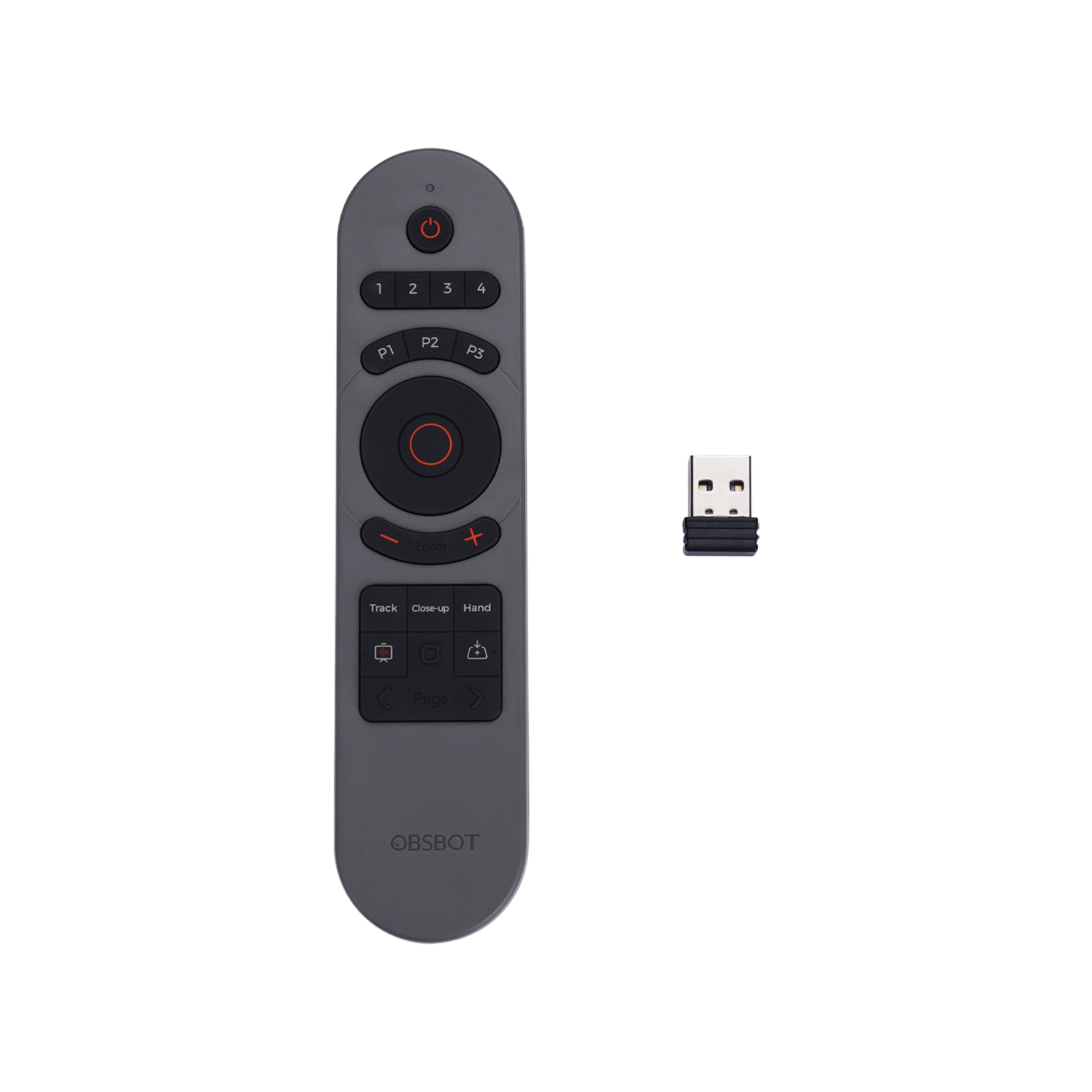
The OBSBOT Tiny Smart Remote 2 ORB-2209-CT combines a dedicated camera controller and presentation clicker in one compact handheld device. Designed primarily for the OBSBOT Tiny 2 and compatible Tiny-series webcams, it provides convenient physical control over camera movement, zoom, AI tracking modes, presets and presentation functions without requiring constant access to the OBSBOT software interface.
Key Features:
- Smart remote controller designed for OBSBOT Tiny series webcams
- Combines PTZ webcam control and presentation clicker functions
- Includes compact USB-A wireless receiver / dongle
- Select and control up to 4 compatible OBSBOT cameras
- Dedicated directional control for pan and tilt adjustment
- Zoom in and zoom out controls
- 3 programmable preset position controls - P1, P2 and P3
- Dedicated Human Tracking control
- Close-up mode activates Human Tracking with Auto Zoom
- Dedicated Hand Tracking control
- Desk Mode shortcut for supported OBSBOT webcams
- Laser-Whiteboard function for presentations and whiteboard close-ups
- Page Up, Page Down, Full Screen and Black Screen presentation controls
- Hyperlink selection and window-switching controls
- Powered by 2 x AAA batteries
Features
Camera Remote & Presentation Clicker in One
The Tiny Smart Remote 2 combines webcam control with common presentation functions, allowing presenters, educators, streamers and meeting hosts to manage both their OBSBOT camera and presentation from a single handheld controller.
Control up to Four Compatible Cameras
Dedicated device selection buttons labelled 1, 2, 3 and 4 allow the operator to select between up to four compatible OBSBOT devices. This is particularly useful for multi-camera presentations, livestreams and production environments.
Precise PTZ & Zoom Control
A large directional control provides convenient up, down, left and right gimbal movement for supported OBSBOT PTZ webcams. Pressing the centre control returns the camera to its initial position, while dedicated zoom buttons provide quick zoom-in and zoom-out adjustment.
Three Preset Camera Positions
P1, P2 and P3 buttons provide fast access to preset camera positions. This makes it easy to move between frequently used views during presentations, meetings, online teaching and livestreaming without manually repositioning the camera each time.
Human Tracking & Auto Zoom
The dedicated Track button switches supported Human Tracking on or off, while the Close-up control activates Human Tracking together with Auto Zoom. This allows the camera to automatically maintain a tighter composition around the presenter or subject.
Hand Tracking Control
A dedicated Hand button provides quick access to Hand Tracking on compatible OBSBOT webcams, helping creators and presenters focus the camera on demonstrations, handwriting and other hand-based activities.

Laser-Whiteboard Mode
The Laser-Whiteboard control combines the presentation laser with OBSBOT's compatible Whiteboard Close-up functionality. Holding the button activates the laser, while a double press can enter or exit Whiteboard Close-up mode on supported webcams.
Desk Mode Shortcut
A dedicated Desk Mode button allows compatible OBSBOT webcams to quickly switch into a viewing configuration designed for showing documents, artwork, products or other items positioned on a desk.
Presentation Controls
The Tiny Smart Remote 2 includes Page Up and Page Down controls for presentations. Long-press functions can also enter or exit full-screen mode and activate or exit a black presentation screen, providing useful presentation control without returning to the computer.
Hyperlink & Window Controls
The Hyperlink button supports hyperlink selection and opening during presentations, while a long press can be used to switch between open windows on a compatible computer.
USB-A Receiver for Simple Setup
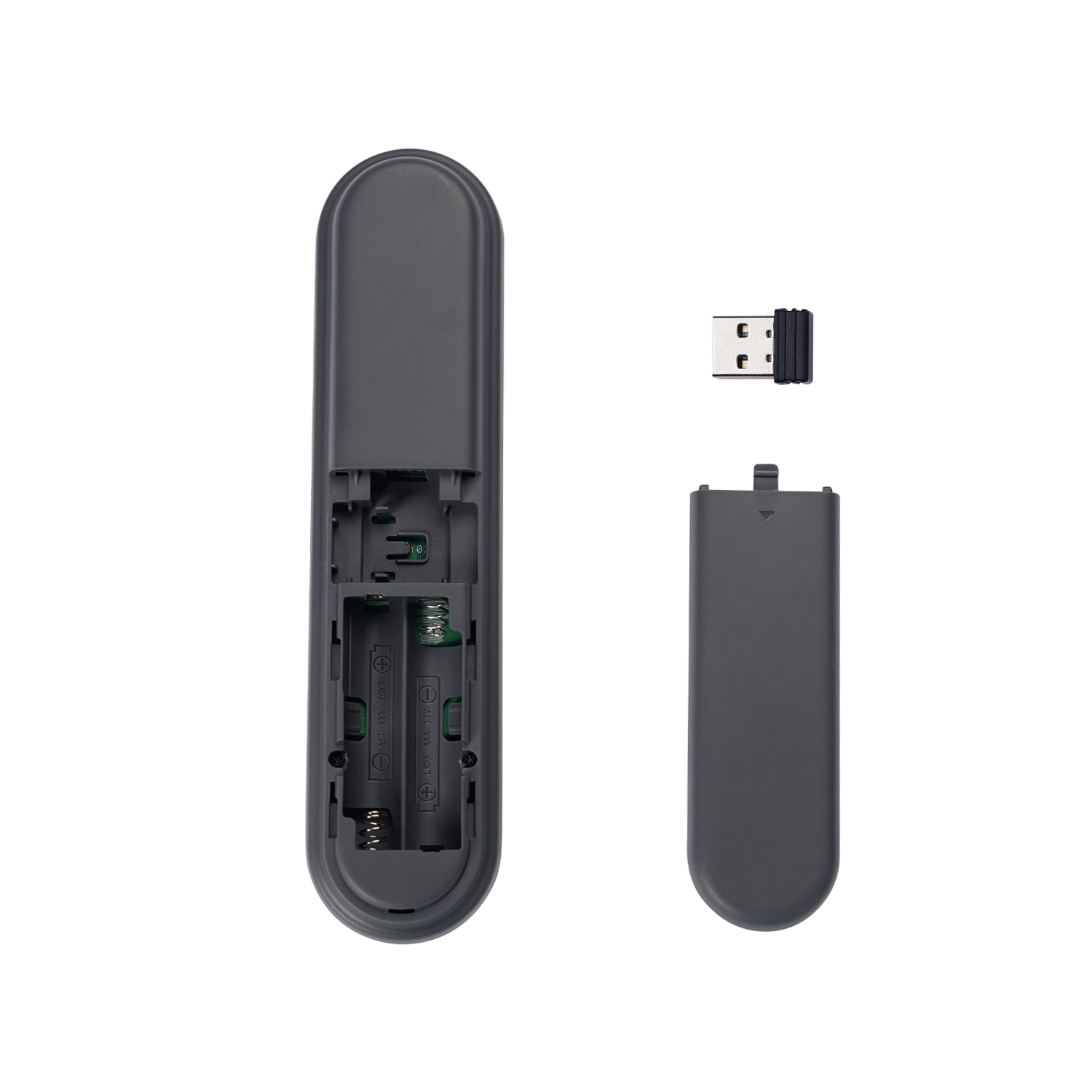
The included USB receiver is stored conveniently in the rear of the remote controller. To use the remote, insert the receiver into a compatible USB-A port on the computer, connect the OBSBOT webcam and enable Remote Controller support in OBSBOT Center / compatible OBSBOT software.
AAA Battery Powered
The remote operates using two AAA batteries, allowing the batteries to be replaced easily when required without waiting for the controller to recharge.
- 2 x AAA batteries are required and may be sold separately.
- Some remote functions depend on the features supported by the connected OBSBOT webcam.
- OBSBOT notes that certain buttons are not fully functional with older Tiny and Tiny 4K models because those cameras do not support the corresponding features.
- The laser must never be directed towards a person's eyes.
- Compatible OBSBOT webcam is sold separately.
- Specifications and images may vary depending upon region / model.
Technical Specifications:
| Specification | Details |
| Brand | OBSBOT |
| Model | Tiny Smart Remote 2 |
| Product Code / MPN | ORB-2209-CT |
| Product Type | Webcam Remote Controller / Presentation Clicker |
| Primary Compatibility | OBSBOT Tiny 2 |
| Current OBSBOT Compatibility | OBSBOT Tiny 3 OBSBOT Tiny 3 Lite OBSBOT Tiny 2 OBSBOT Tiny 2 Lite OBSBOT Tiny SE OBSBOT Tiny 4K OBSBOT Tiny |
| Computer Connection | USB-A Receiver / Dongle |
| USB Receiver Included | Yes |
| USB Receiver Storage | Integrated Storage on Rear of Remote |
| Maximum Selectable Devices | Up to 4 Compatible Devices |
| Device Selection | Camera 1 / 2 / 3 / 4 |
| Pan Control | Yes |
| Tilt Control | Yes |
| Gimbal Direction Control | Up / Down / Left / Right |
| Gimbal Reset | Yes - Return to Initial Position |
| Zoom Control | Zoom In / Zoom Out |
| Preset Positions | 3 - P1 / P2 / P3 |
| Human Tracking Control | Yes |
| Close-up Mode | Human Tracking with Auto Zoom |
| Hand Tracking Control | Yes |
| Desk Mode Control | Yes |
| Whiteboard Control | Laser-Whiteboard / Whiteboard Close-up |
| Presentation Laser | Yes |
| Laser Wavelength | 650nm |
| Presentation Page Control | Page Up Page Down |
| Full-Screen Control | Yes - Via Long Press of Page Up |
| Black Screen Control | Yes - Via Long Press of Page Down |
| Hyperlink Control | Select Hyperlink Open Hyperlink Switch Between Open Windows |
| Status Indicator | Yes |
| Power Source | 2 x AAA Batteries |
| Batteries Included | No / Sold Separately |
| Colour | Dark Grey |
| Warranty | 1 Year |
| Package Contents | 1 x OBSBOT Tiny Smart Remote 2 1 x USB-A Receiver / Dongle |
| Interface | USB-A Receiver |
Choose the OBSBOT Tiny Smart Remote 2 ORB-2209-CT for convenient physical control of compatible OBSBOT Tiny webcams, combining PTZ and zoom adjustment, AI tracking shortcuts, preset positions, multi-camera selection and professional presentation controls in one handheld remote.
Payment & Security
Payment methods
Your payment information is processed securely. We do not store credit card details nor have access to your credit card information.
